

To complete dext login, go to app.dext.com, enter your registered email and password, and access your dashboard to manage receipts, invoices, and business expenses in one place.
If you are a business owner, accountant, or freelancer, managing receipts and expense records can consume valuable time. Paper receipts get lost, invoices pile up, and manual data entry often leads to mistakes. Dext helps solve these issues by providing a structured system for capturing and organizing financial documents online.
This detailed guide explains everything about dext login, how to access it, how to fix common issues, what features you can use after signing in, and which pricing plan may suit your needs.
What is Dext?
Dext is a cloud-based expense and document management platform designed to simplify bookkeeping tasks. It allows users to upload receipts, invoices, and bills, then automatically extracts key information such as supplier name, transaction date, totals, and tax amounts.
The platform was previously known as Receipt Bank before it was rebranded to Dext. Today, it serves small businesses, accountants, and e-commerce sellers who want to reduce manual accounting work.
Dext connects directly with accounting software such as QuickBooks, Xero, Sage, and FreeAgent. Once connected, financial data can be transferred without retyping information, which improves efficiency and reduces errors.
In simple terms, dext login gives you access to a system that turns physical paperwork into organized digital records.
Dext Login Page
The dext login page is the secure access point for your account. Users can log in through:
👉 https://app.dext.com
After signing in, you are directed to your dashboard where all uploaded documents and financial records are stored.
From this portal, users can manage expense documents, review extracted data, approve transactions, invite team members, and connect accounting software. Everything is structured in a clear interface so users can track financial information easily.
The login page also supports secure verification methods, ensuring that only authorized users can access sensitive business data.
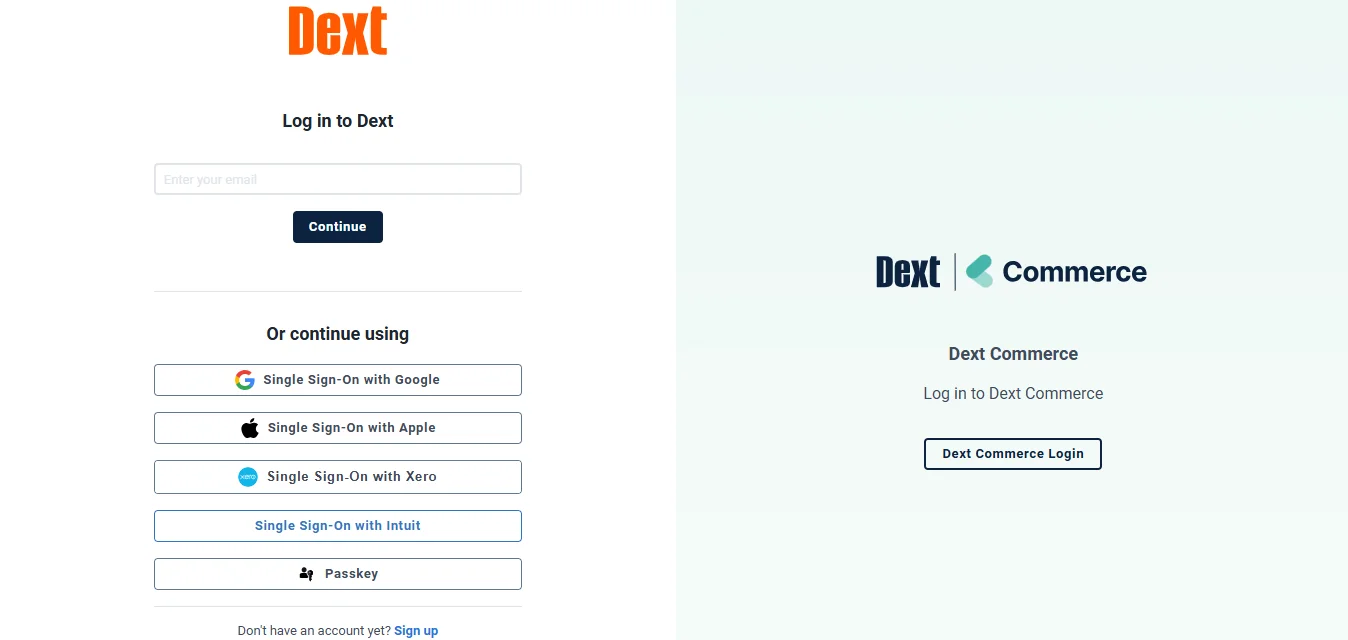 How to Access Dext Login (Step-by-Step)
Step 1: Visit the Official Website
Go to https://app.dext.com or visit https://dext.com and click the Login button. Choose the correct product if prompted.
Step 2: Enter Email and Password
Use the registered email address and password associated with your Dext account.
Step 3: Complete Verification (If Enabled)
If multi-factor authentication is enabled, enter the verification code sent to your device or email.
Step 4: Access Your Dashboard
Once authentication is successful, you will see your main dashboard where you can manage all receipts and expenses.
What to Do If Dext Login Fails
Login problems can happen occasionally, but most issues are easy to fix. If your login fails, carefully check your email and password for spelling mistakes. Even a small typing error can prevent access.
If you forgot your password, use the reset option available on the login page. After clicking “Forgot Password,” you will receive a reset link via email. Follow the instructions to create a new password.
Sometimes login problems are related to browser issues. Clearing your browser cache, updating your browser, or switching to a different browser can resolve the problem.
If your account becomes locked after multiple failed attempts, wait a few minutes before trying again. If access is still blocked, contacting Dext support is the best solution.
Two-factor authentication delays may occur if verification emails are filtered into spam folders. Always check junk mail if you do not receive the security code.
Dext Mobile Login
Dext also provides a mobile application for users who manage expenses outside the office. The mobile app is available on Android and iOS devices.
After installing the app, you simply open it, tap login, and enter your registered credentials. The mobile login process works the same way as the web version, including two-factor authentication if enabled.
The mobile app allows users to capture receipts instantly using their phone camera. This feature is especially helpful for employees who travel frequently or collect paper receipts during business activities.
Using the mobile version ensures that receipts are uploaded immediately, reducing the risk of losing important documents.
Dext Login Options for Different Users
Dext offers multiple products based on user needs. Choosing the correct platform ensures smooth login access.
Dext Prepare is mainly designed for bookkeeping and document management. It is suitable for small businesses and accounting firms that manage receipts and invoices daily.
Dext Precision focuses on reviewing and verifying accounting data. Accountants who want to check for inconsistencies or errors inside accounting software often use this platform.
Dext Commerce is built for e-commerce sellers. It gathers transaction data from online selling platforms and organizes it for accounting purposes.
Selecting the correct login portal for your product version prevents login confusion and ensures proper access.
Key Features After Dext Login
Once logged in, users can access several powerful tools that simplify financial management.
Receipt and invoice upload is one of the core features. Users can upload files from their computer, send documents through email, or take photos using the mobile app. After uploading, Dext automatically extracts relevant details and organizes them.
Automatic data extraction reduces the need for manual entry. The system identifies supplier names, amounts, tax values, and transaction dates, helping maintain consistent financial records.
Integration with accounting software ensures that extracted data flows directly into your bookkeeping system. This connection removes duplication and saves time.
Team collaboration features allow multiple users to work within the same account. Permissions can be assigned based on roles, ensuring secure access.
Reporting tools provide summaries of spending patterns, tax information, and expense categories. These insights help business owners make informed financial decisions.
Benefits of Using Dext Login
Using dext login regularly provides practical benefits for businesses.
It saves time by automating document processing, which reduces hours spent on manual entry.
It improves accuracy since automatic extraction minimizes typing errors.
It provides cloud-based access, allowing users to log in from anywhere with an internet connection.
It keeps documents organized in one searchable location, which simplifies record retrieval during audits or tax preparation.
It improves collaboration between business owners and accountants by allowing shared access to financial documents.
Read Also:
Dext Pricing Plans
Dext offers different pricing tiers based on user needs, document volume, and business size. Below is a general overview of where each plan is suited.
Plan Type | Best Suited For | Typical Features |
|---|---|---|
Basic / Essentials | Freelancers and small businesses | Receipt capture, limited integrations, single or few users |
Business Plan | Growing companies | Higher document limits, multiple users, advanced integrations |
Accountant Plan | Accounting firms | Multi-client management, team collaboration tools |
Commerce Plan | E-commerce sellers | Sales data collection from online platforms |
Advanced / Custom | Large firms | Custom limits, priority support, advanced controls |
Pricing may vary depending on the number of users and monthly document limits. Businesses should review the official pricing page for updated details.
Is Dext Login Safe?
Security is a major concern when handling financial data. Dext uses encrypted connections to protect sensitive information.
Multi-factor authentication adds another layer of protection during login. This means even if someone knows your password, they cannot access your account without the verification code.
The platform also follows data protection regulations to ensure privacy standards are maintained. These measures make Dext a reliable system for managing financial records online.
Why Dext Login Matters for Businesses
The dext login portal is more than just a sign-in page. It is the gateway to automated document management and improved bookkeeping processes.
Businesses that use Dext often experience faster month-end closing because documents are already categorized and organized.
Accountants benefit from cleaner records and reduced back-and-forth communication with clients.
During tax season, having all receipts stored digitally reduces stress and saves preparation time.
Alternatives to Dext
While Dext is a popular solution, some businesses may explore other tools depending on their needs. Hubdoc focuses on document collection and storage. Expensify is widely used for employee expense reporting. AutoEntry specializes in data extraction from invoices. Zoho Expense is suitable for companies already using Zoho products.
Each tool offers similar features, but pricing and integrations may differ.
Final Thoughts
Dext login provides secure access to an organized expense management system designed to reduce paperwork and improve efficiency.
Whether you manage a small business, work as a freelancer, or handle accounting for multiple clients, Dext helps simplify financial document processing.
By logging in through the web or mobile app, users can upload receipts, extract data automatically, sync with accounting software, and keep everything stored in one secure dashboard.
If your goal is to reduce manual accounting tasks and maintain accurate financial records, using Dext can be a practical solution.
Frequently Asked Questions
What does dext login allow me to do?
It allows you to access your Dext dashboard to upload, manage, and sync receipts and expense records.
Is mobile login supported?
Yes, you can log in through the Dext mobile app using the same credentials.
How do I reset it?
Click “Forgot Password” on the login page and follow the email instructions.
What are common reasons?
Incorrect credentials, browser cache issues, or using the wrong Dext platform link.
Is my financial data protected?
Yes, Dext uses encryption and multi-factor authentication to keep accounts secure.