


The right tablet can replace a backpack full of notebooks, textbooks and a laptop, or it can sit in a drawer after week three because it could not keep up. The difference is buying for how you actually study, not for the flashiest spec sheet.
A note-taker needs a great stylus. A reader needs a comfortable screen and long battery. A student stuck with Windows-only software needs something closer to a laptop.
One tablet is rarely best at all of those, so this guide sorts the best current options by what each one is truly for.
Every pick here is a model you can actually buy in 2026. Prices shift often and vary by retailer and storage, so treat the figures as ballpark and confirm the live price before you buy.
Quick Picks
If you just want the short answer, here it is. The rest of the guide explains the why.
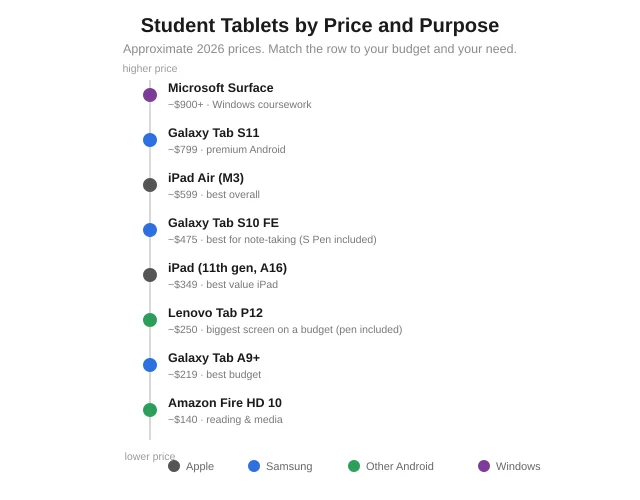
Best overall: Apple iPad Air (M3)
Best value iPad: Apple iPad (11th gen, A16)
Best for note-taking: Samsung Galaxy Tab S10 FE (S Pen included)
Best premium Android: Samsung Galaxy Tab S11
Best budget: Samsung Galaxy Tab A9+
Best big screen on a budget: Lenovo Tab P12
Best for reading and media: Amazon Fire HD 10
Best for Windows coursework: Microsoft Surface
 Best Overall: Apple iPad Air (M3)
For most students, the iPad Air is the tablet to beat, and the reason is not raw power. It is the ecosystem around it.
The iPad Air pairs a fast M-series chip with the best note-taking apps available, GoodNotes, Notability and the like, plus years of guaranteed software updates, so it comfortably lasts a full degree.
The 11-inch display is the sweet spot for split-screen work: notes on one side, a lecture slide or PDF on the other.
The catch is accessories.
The Apple Pencil is sold separately and adds meaningfully to the price, and a keyboard is extra again.
Budget for the Pencil if you plan to handwrite, because the iPad's writing experience with it is still the one every other tablet is measured against.
Approximate price: around $599 for the tablet, plus roughly $129 for the Pencil.
Best for: students who want the strongest app ecosystem and long-term reliability, and do not mind paying for accessories.
Best Value iPad: Apple iPad (11th gen, A16)
If you want into the Apple world without the Air's price, the standard iPad is the smart entry. It runs the same key study apps and gets the same long support window, for noticeably less.
You give up some polish, the screen is not laminated the way the Air's is, so the pen feels a touch further from the glass, and the chip is slower.
For notes, reading, browsing, video calls and writing essays, though, none of that holds a typical student back.
It is the tablet I would point most school and early-college students toward if they are set on an iPad but watching their budget.
Approximate price: around $349 for the tablet, with the Pencil extra.
Best for: students who want the iPad ecosystem and app support at the lowest Apple price.
Best for Note-Taking: Samsung Galaxy Tab S10 FE
Here is where Samsung lands a real blow. The Galaxy Tab S10 FE includes the S Pen in the box, no separate purchase, and Samsung Notes has quietly become excellent.
That changes the value math completely. Where an iPad plus Pencil climbs toward $700, the Tab S10 FE gets you a large 10.9-inch screen, a 90Hz panel that makes handwriting feel smooth, and a really good stylus for a good deal less, all in.
Battery life easily clears a full day of classes.
For a student whose main job is handwriting notes and annotating lecture slides, this is the value champion, and my top note-taking pick.
Approximate price: around $449 to $500, S Pen included.
Best for: note-takers who want a stylus in the box and strong value over ecosystem prestige.
Best Premium Android: Samsung Galaxy Tab S11
If you want a flagship Android tablet and not a value one, the Galaxy Tab S11 is the pick.
It brings a bright 11-inch AMOLED display, fast hardware, an included S Pen, and Samsung's DeX mode, which turns the tablet into something close to a desktop when you connect a keyboard.
That DeX trick makes it the most laptop-like Android tablet here, appealing if you want one device that streams media beautifully and still handles real work.
It costs accordingly, so it suits students who want top-tier and will use the extra capability.
Approximate price: around $799, S Pen included.
Best for: students wanting a premium, do-everything Android tablet with desktop-style multitasking.
Best Budget: Samsung Galaxy Tab A9+
Not everyone needs a flagship, and the Galaxy Tab A9+ proves a cheap tablet can still pull its weight for studying.
For a low price it gives you an 11-inch screen, decent battery, and smooth enough performance for notes, reading, browsing and video calls.
You are not getting a premium display or a bundled stylus, and it will not fly through heavy multitasking. But for a student who mainly reads, watches lectures and types the odd assignment, it does the core jobs without straining a tight budget.
Approximate price: around $219, often less on sale.
Best for: budget-first students who need the essentials done reliably, not flagship polish.
Best Big Screen on a Budget: Lenovo Tab P12
Students who read a lot of PDFs and textbooks feel cramped on a small screen, and the Lenovo Tab P12 answers that with a large display and an included pen for a price that undercuts the big names.
That extra screen space is a real advantage for side-by-side notes, dense diagrams, or reading a full textbook page without endless zooming.
Software support is not as long as Apple's or Samsung's flagship line, so it is more a strong few-year tool than a buy-once-for-a-decade device, but the screen-per-dollar is hard to match.
Approximate price: around $250, pen included on sale.
Best for: heavy readers and PDF annotators who want the most screen for the least money.
Best for Reading and Media: Amazon Fire HD 10
If your "studying" is mostly reading eBooks, watching recorded lectures and light browsing, you do not need to spend big. The Fire HD 10 is cheap, light, and perfectly good for consuming content.
The honest trade-off is Amazon's app store, which lacks many mainstream apps, and weaker performance for real productivity. This is a reading-and-media tablet, not a note-taking or multitasking one.
Within that lane, at its price, nothing else comes close for casual student use or as a cheap second screen.
Approximate price: around $140, frequently discounted.
Best for: students who mainly read, stream and browse and want to spend as little as possible.
Best for Windows Coursework: Microsoft Surface
Some degrees demand full desktop software, engineering tools, statistics packages, specific Windows-only programs, that no iPad or Android tablet can run. If that is you, a Microsoft Surface is the answer.
A Surface is really a Windows laptop in tablet form: it runs the full desktop operating system, takes a detachable keyboard, and supports a pen.
That makes it the true tablet-laptop hybrid here, and the only pick that fully replaces a laptop for demanding coursework.
You pay laptop money for it, and that is the point.
Approximate price: varies widely by model, from mid-range to premium laptop pricing.
Best for: students whose courses require desktop Windows software, not just apps.
How to Choose the Best Tablet for Students
With the picks laid out, the decision comes down to a few honest questions. If you are weighing a tablet against a full computer first, our guide to the best laptops for students is worth a look alongside this one.
Do you handwrite notes? If yes, the stylus matters most. Samsung includes the S Pen; Apple charges extra but sets the quality bar. If you type notes, this matters far less.
Which ecosystem are you in? If your phone and laptop are Apple, an iPad slots in seamlessly. If you are on Android and Google apps, a Galaxy Tab feels more natural and often costs less.
How much screen do you need? Around 10 to 11 inches suits most students, portable yet big enough for split-screen. Heavy readers and diagram-drawers benefit from 12 inches or more.
What is your real budget, accessories included? An iPad's true cost includes the Pencil and often a keyboard. A Samsung with a bundled S Pen can be the cheaper complete package even at a similar sticker price.
Count the whole kit. For narrowing by price, our roundup of budget tablets goes deeper on the under-$300 field.
Tablet vs Laptop for Students
A fair question, and the honest answer is that it depends on your coursework, not on which is better overall.
A tablet wins on portability, battery life, handwriting and reading.
For taking notes in lectures, annotating PDFs, joining online classes and getting through readings, it is lighter and often nicer to use than a laptop, and a tablet with a keyboard covers plenty of writing too.
A laptop wins on heavy typing, real multitasking, and any serious desktop software, coding, engineering tools, large spreadsheets, statistics packages.
If your degree leans on those, a laptop, or a Surface that behaves like one, is the safer core device.
Many students end up with a tablet as their everyday carry and a laptop for the heavy lifting. If you can own only one, let your hardest software requirement decide.
Frequently Asked Questions
What is the best tablet for students overall?
The Apple iPad Air (M3) for most people, thanks to its app ecosystem and long support. For the best value with a stylus included, the Samsung Galaxy Tab S10 FE is the strongest alternative.
Is an iPad or Android tablet better for students?
iPads offer the best app optimization and longest support. Android tablets often cost less and include a stylus. Pick the one matching your phone and preferred apps.
What is the best tablet for taking notes?
The Samsung Galaxy Tab S10 FE is the value pick with its included S Pen, while the iPad Air with Apple Pencil remains the gold standard for handwriting feel if budget allows.
What is the best budget tablet for students?
The Samsung Galaxy Tab A9+ around $219 covers the essentials well. For a bigger screen on a budget, the Lenovo Tab P12 includes a pen for a little more.
Do students need a tablet with a stylus?
Only if you handwrite notes or annotate PDFs and diagrams. If you type your notes, you can skip the stylus and save money. For handwriting, it is essential.
How much should a student spend on a tablet?
Around $220 to $350 covers solid budget and mid options; $450 to $600 gets a strong note-taking or premium tablet. Remember to add the stylus and keyboard if the tablet needs them.
What size tablet is best for studying?
Ten to eleven inches suits most students, balancing screen space and portability. Heavy readers or students working with large diagrams may prefer 12 inches or more.
Is a tablet better than a laptop for students?
For notes, reading, lectures and portability, yes. For heavy typing, coding, or desktop software, a laptop is better. Many students use a tablet daily and keep a laptop for demanding work.
Do students need a keyboard for a tablet?
If you write long essays or reports on it, a keyboard helps a lot and turns the tablet into a light laptop. For mostly handwriting and reading, it is optional.
The Bottom Line
There is no single best tablet for students, only the best one for how you study.
The iPad Air is the safest all-rounder, the Galaxy Tab S10 FE is the value note-taking champion, the Tab A9+ and Lenovo Tab P12 cover tight budgets, and a Surface is the answer when only Windows will do.
Start with your real needs: do you handwrite or type, which ecosystem are you in, how much screen you want, and your budget with accessories counted in. Answer those and the right pick from this list is usually obvious.
Buy for your actual study habits, not the spec sheet, and the tablet becomes the tool that carries you through the whole degree, not the one gathering dust by midterms.