
Compare the Latest Gadgets on the Market
Easily compare features, specifications, and prices of the latest gadgets side by side. Make informed decisions with detailed comparisons to find the perfect product that fits your needs and budget.
TCL Roku TV Remote
Product 1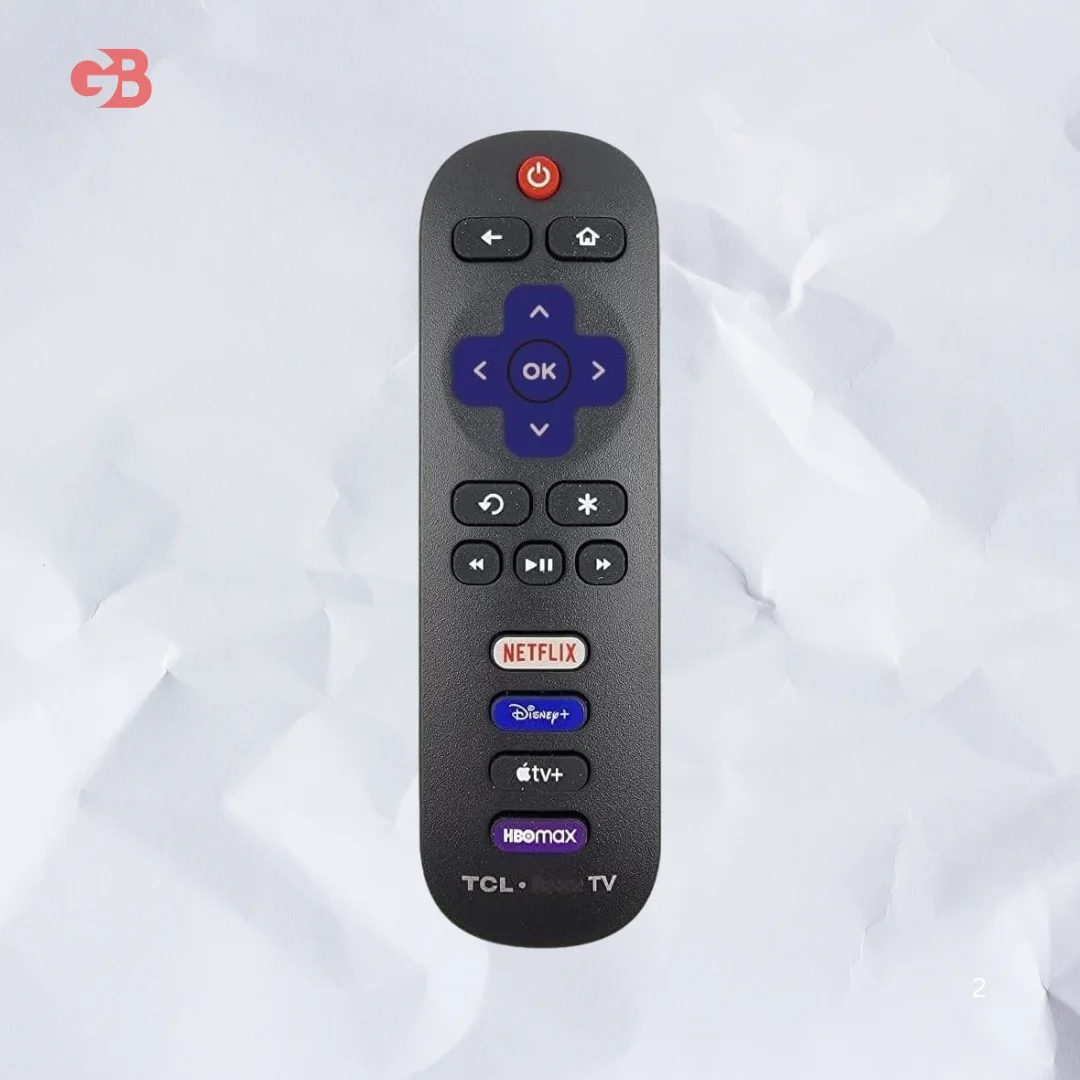
Lost your original remote? This TCL Roku TV remote replacement needs zero setup, includes 4 streaming shortcuts, and works with most TCL Roku Smart TV models.
Introduction
So my cousin called me last week, proper panicking.
He goes "Bro i have lost my remote" and I was like okay calm down, it happens to everyone.
His TCL Roku TV was just sitting there, totally unusable. No remote, no way to navigate anything. The Roku app on his phone works sometimes but it lags and disconnects every five minutes.
I told him just get a replacement remote, it's not that serious.
But then he started asking me which one, does it need pairing, will it work, is it original. And honestly I didn't know enough at that point so I did some digging.
This is everything I found.
What Is This TCL Roku TV Remote
This is an OEM replacement remote control built specifically for TCL Roku TVs.
It is a standard infrared remote. No Bluetooth, no WiFi, just point and click like the original.
What I like about it is that it comes with four shortcut buttons already on it. Netflix, Disney Plus, Apple TV Plus and HBO Max. So we don't have to scroll through the whole Roku menu every time.
I use Netflix literally every day so having that one button is actually useful and not just a gimmick.
How to Set Up the TCL Roku TV Remote
This is the part I was most curious about because some replacement remotes are a headache to set up.
This one needs zero setup. Seriously zero.
I just put in two AAA batteries and it worked immediately. No pairing button, no holding buttons for five seconds, nothing like that.
The only thing I want to mention here is that the batteries are not included in the box. So keep two AAA batteries ready before you open the package because otherwise you will be making an extra trip to the shop.
How to Maintain Your TCL Roku TV Remote
Maintaining a remote is something most of us never think about until it stops working.
Wipe it down with a dry cloth every couple of weeks. Dust and oil from our hands build up in the button gaps over time and that actually causes buttons to stick or become unresponsive.
Never put it near water. Not on the kitchen counter, not near a glass. One spill and it's done.
Store it properly when not in use. My biggest remote graveyard mistake was always leaving it on the sofa where it falls under the cushions and gets bent or dropped constantly.
And when the battery performance starts to drop, replace both batteries at the same time. Using one old and one new battery causes inconsistent performance.
Customer Reviews
People who bought this remote seem genuinely happy with how easy it is to use.
The most common thing I kept reading was that it worked right out of the box with no confusion at all. That matters a lot because no one wants to read a manual just to use a remote.
A few buyers mentioned the button layout feels familiar because it closely matches the original TCL remote design. So there is no learning curve at all.
Some reviews did point out that it does not have a headphone jack or voice search button. That is a real limitation if you were using those features on your original remote.
Overall though the feedback is pretty positive for what it costs.
Read Also
Bellroy Venture Ready Sling 2.5L
Frequently Asked Questions
Does the TCL Roku TV remote need pairing or programming?
No, just insert two AAA batteries and it works immediately with no setup needed.
Will this remote work with Roku Stick or Roku Box?
No, it only works with TCL Roku TVs and does not support Roku Stick, Box, or Players.
Does it have a voice search button?
No, this is a standard IR remote with no voice search, no headphone jack, and no pairing button.
Which TCL models is this remote compatible with?
It works with a large range including 32S327, 43S455, 50S455, 55S555, 65R655, 75S455 and many more TCL Roku TV models.
What batteries does it use?
It requires two standard AAA alkaline batteries which are not included in the package.
Can I use this remote for other brand Roku TVs?
This specific version is made for TCL Roku TVs only and may not reliably work with other brands.
Features
Works with all TCL Roku Smart 4K TVs
Four shortcut buttons for Netflix, Disney Plus, Apple TV Plus and HBO Max
Standard infrared remote control
No programming or pairing required
Upgraded chip for stable and durable performance
TV power button and volume controls included
Compact and lightweight design
Compatible with a wide list of TCL Roku TV model numbers
Simple button layout matching original remote design
Response time under 0.1 seconds
Specifications
Brand: OEM Replacement
Compatible Devices: TCL Roku Smart TVs
Remote Type: Standard Infrared IR
Shortcut Buttons: Netflix, Disney Plus, Apple TV Plus, HBO Max
Pairing Required: No
Programming Required: No
Power Source: 2 AAA alkaline batteries (not included)
Voice Search: Not supported
Headphone Jack: Not supported
Max Operating Distance: Up to 25 feet
TV Response Time: Under 0.1 seconds
Compatible Models Include: 32S327, 32S335, 32S355, 40S327, 43S455, 49S405, 50S425, 50S455, 55S421, 55S455, 55S555, 58S455, 65R655, 65S455, 75S455, 85S455 and many more
Not Compatible With: Roku Stick, Roku Box, Roku Express, Roku Ultra, Roku Player
Pros
Zero setup needed, works immediately after inserting batteries
Four popular streaming shortcut buttons included
Wide compatibility across many TCL Roku TV models
Upgraded chip for long lasting reliable performance
Affordable price for a quality replacement remote
Button layout matches original remote so no adjustment needed
Lightweight and easy to hold during long sessions
Cons
AAA batteries not included in the box
No voice search button
No headphone jack on the remote
Does not work with Roku Stick, Box or streaming players
Not compatible with non TCL brand Roku TVs
Select Product 2
Choose a product to compare