
Compare the Latest Gadgets on the Market
Easily compare features, specifications, and prices of the latest gadgets side by side. Make informed decisions with detailed comparisons to find the perfect product that fits your needs and budget.
ROG Strix G16
Product 1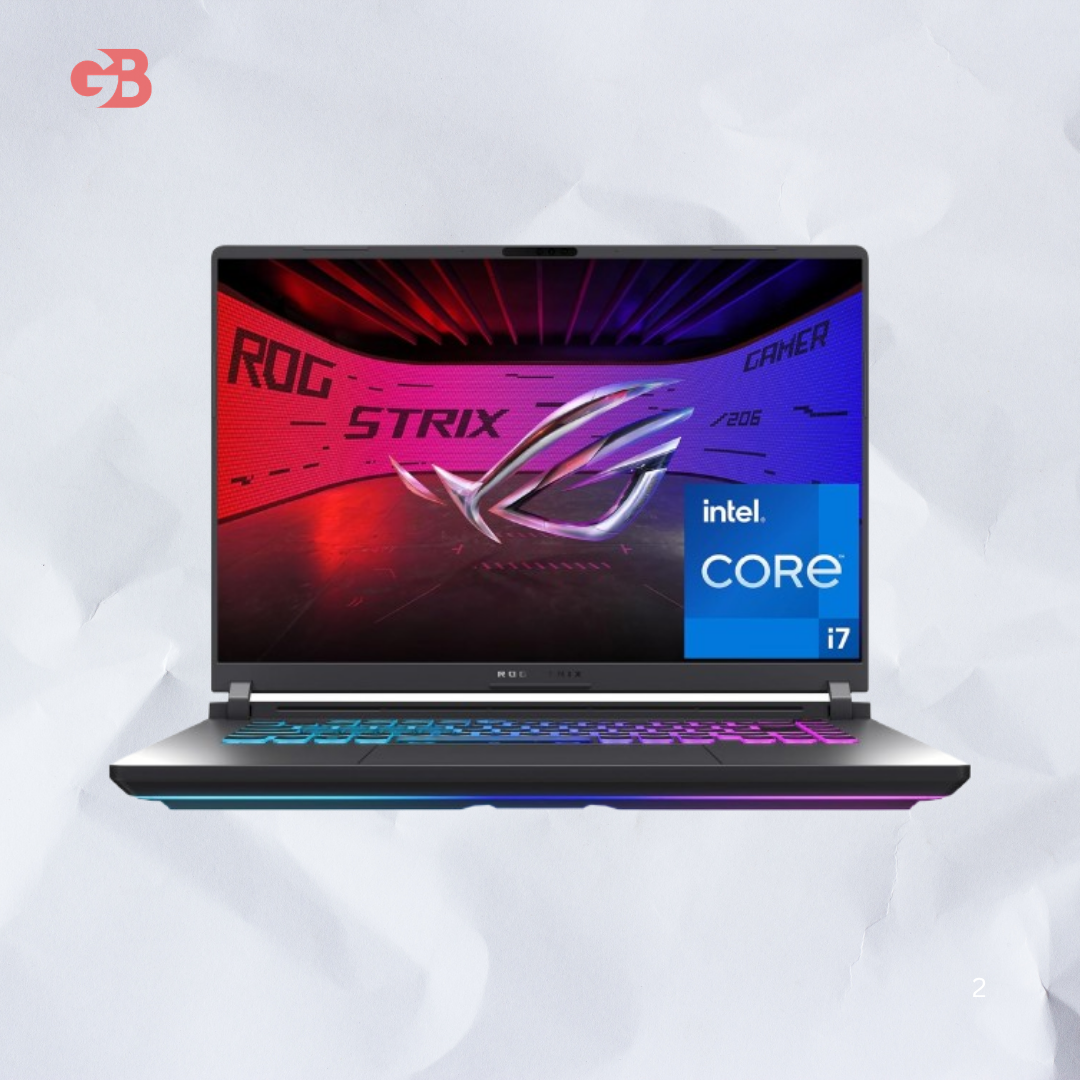
ROG Strix G16 2025 delivers RTX 5070 Ti power, 240Hz display options, triple fan cooling, and upgradeable RAM and storage across configurations from $1,599 to $2,499.
Introduction
My friend sent me a message at like 11pm.
"Bro I want a serious gaming laptop. Not mid. Actual serious."
I told him give me a day to look into it properly.
I had already seen the ROG Strix G16 come up a few times.
So I dug into it. Read everything I could find. And here is what I actually think.
So What Even Is the ROG Strix G16
The ROG Strix G16 is ASUS's flagship mid to high range gaming laptop for 2025.
It sits under the Republic of Gamers brand.
ROG makes the serious stuff. Not the entry level budget machines. The ones built for people who actually game hard.
The G16 specifically sits one step below the ROG Strix Scar 16.
You get most of the same power at a noticeably lower price. That gap is what makes it interesting.
The Build and Design
The lid is aluminum.
The rest of the body is ABS plastic which is worth knowing upfront.
It is not a fully premium metal build. Some people will care about that. Most gamers will not.
The design screams ROG from every angle.
Textured striped exhaust vents, large side grilles, a back vent, RGB lighting on the keyboard, and the ROG logo on the lid with "For Those Who Dare" printed underneath.
It is chunky looking on purpose. This thing is not trying to hide what it is.
At around 2.5kg it is heavier than some competitors.
If you carry a laptop every single day that weight matters. As a desktop replacement it is not a problem at all.
The Display Options
Here is the thing. The display you get depends on the configuration you pick.
Entry models come with a 1200p IPS panel at 165Hz with 300 nits brightness and 100% sRGB coverage.
Higher end configurations step up to a 1600p 240Hz IPS panel with 500 nits, G-Sync, 100% DCI-P3, and Dolby Vision support.
That second display is significantly better.
If you plan to game directly on the laptop screen, I would push for the 240Hz 1600p version.
217 FPS in Counter Strike 2 at 1600p means absolutely nothing if your screen only does 165Hz.
The CPU
The top configuration runs the AMD Ryzen 9 9955HX3D.
16 cores. Max boost up to 5.4GHz. 128MB of L3 cache.
AMD calls it the world's fastest mobile gaming processor and from what I found in testing, it backs that claim up in productivity work especially.
Some configurations use the Ryzen 9 8940HX instead.
Both are strong. The 9955HX3D pulls ahead in heavily threaded workloads and anything that benefits from the large cache.
The GPU and Real Gaming Numbers
The GPU options are RTX 5060, RTX 5070, or RTX 5070 Ti.
The RTX 5070 Ti configuration runs at up to 140W TGP with Dynamic Boost.
That power envelope matters. Higher TGP means better real world performance from the same GPU compared to other laptops running it at lower wattage.
From what I saw in testing this is the fastest RTX 5070 Ti laptop tested so far.
In Black Myth Wukong it hits 101 FPS at 1600p on High settings.
In Shadow of the Tomb Raider it reaches 162 FPS at 1200p and 102 FPS at native 1600p on the highest preset.
Counter Strike 2 pushes 217 FPS at 1600p on Very High.
These are not made up numbers. These are consistent results across multiple testing runs.
Cooling System
Three internal fans keep temperatures in check.
The CPU and GPU both use liquid metal thermal compound and an improved heatsink design.
During a 60 minute stress test the GPU averaged 2422 MHz clock speed with temperatures settling at 80 degrees Celsius.
That is excellent sustained performance for a laptop at this level.
The fans do get loud under full load. That is not specific to this laptop. Every machine with this level of power does the same thing.
RAM and Storage
The base models ship with 16GB of DDR5 5600MHz RAM.
Higher configurations come with 32GB.
The RAM slots are user accessible and upgradeable to 64GB total if needed.
Storage is a PCIe Gen 4 SSD on one slot.
The second M.2 slot can take a PCIe Gen 5 drive for a future upgrade.
That flexibility to grow the system over time is something I genuinely appreciate in a laptop at this price.
Battery Life
The battery is a 90Wh 4-cell unit.
For web browsing and video watching expect around 5 to 6 hours.
Gaming drops that closer to 3 to 4 hours depending on how demanding the game is.
USB-C charging with up to 100W power delivery is supported on one of the USB4 ports.
That means in a pinch a compatible power bank or USB-C adapter can top it up.
Not a replacement for the full brick charger but useful when traveling.
Pricing and Configurations
Starting price is $1,599 for the base RTX 5060 model.
$1,699 gets you the RTX 5070.
$1,999 bumps to RTX 5070 Ti on a 165Hz display.
$2,199 steps up to the 240Hz 1600p display with RTX 5070.
$2,399 gets you RTX 5070 Ti with the better display.
$2,499 is the top configuration with the 9955HX3D, 32GB RAM, and full display upgrade.
That range gives a lot of room to choose based on what actually matters to you.
How to Maintain Your ROG Strix G16
Clean the vents every few months with compressed air.
Dust buildup in the triple fan system is the fastest way to kill sustained performance over time.
The bottom panel comes off with standard screws for RAM and SSD access.
Wipe the keyboard and screen with a soft dry cloth regularly.
Keep it on a hard flat surface while gaming. Blocking the bottom vents will push temperatures up immediately.
Update the BIOS and Armoury Crate software when new versions drop. ASUS regularly pushes performance and stability improvements through software updates.
Customer Reviews
People who buy the ROG Strix G16 consistently praise the performance for the price.
The display on higher configurations gets strong feedback for brightness and color accuracy.
The triple fan cooling system earns appreciation for keeping temperatures stable during long sessions.
Some reviewers flag the plastic build as a downside compared to fully aluminum competitors.
A few buyers note the laptop runs loud under full gaming load.
Overall the response is very positive. Most buyers say it delivers exactly what ROG promises at the price point.
Read Also: Bluevua Reverse Osmosis System
Frequently Asked Questions
What GPU options does the ROG Strix G16 come with?
It comes in RTX 5060, RTX 5070, and RTX 5070 Ti configurations depending on which model and retailer you choose.
Is the RAM upgradeable?
Yes, both RAM slots are user accessible and the system supports up to 64GB of DDR5 5600MHz total.
What is the difference between the 165Hz and 240Hz display options?
The 240Hz panel runs at 1600p with 500 nits, Dolby Vision, G-Sync, and 100% DCI-P3. The 165Hz panel is 1200p at 300 nits with 100% sRGB.
How loud does it get while gaming?
Under full load the triple fan system gets audible. It is manageable with headphones on but noticeable in a quiet room.
Does it support USB-C charging?
Yes, one USB4 port supports up to 100W power delivery for USB-C charging on the go.
How does it compare to the ROG Strix Scar 16?
The Scar 16 offers RTX 5080 GPU options and a more premium build but costs around $800 more. The G16 delivers most of the performance at a significantly lower price.
Features
AMD Ryzen 9 9955HX3D processor up to 5.4GHz with 128MB L3 cache
NVIDIA GeForce RTX 5070 Ti at up to 140W TGP with Dynamic Boost
16 inch display options from 165Hz FHD+ to 240Hz WQXGA with Dolby Vision
Triple fan cooling system with liquid metal on CPU and GPU
32GB DDR5 5600MHz RAM upgradeable to 64GB
PCIe Gen 4 SSD with second M.2 slot supporting PCIe Gen 5
90Wh battery with 5 to 6 hours real world use
USB4 with 100W USB-C power delivery charging
Per-key RGB keyboard with ROG Armoury Crate software control
HDMI 2.1 FRL output for external 4K high refresh displays
Wi-Fi 7 and Bluetooth 5.4 wireless connectivity
MUX Switch with Advanced Optimus for direct GPU to display output
Dolby Vision and G-Sync on higher display configurations
Windows 11 Pro preinstalled
Multiple configurations from $1,599 to $2,499
Specifications
Brand: ASUS
Series: ROG Strix
Model: G16 G614 2025
Display: 16 inch IPS, 165Hz FHD+ or 240Hz WQXGA
Resolution Options: 1920x1200 or 2560x1600
Brightness: 300 nits (165Hz) or 500 nits (240Hz)
Color Gamut: 100% sRGB (165Hz) or 100% DCI-P3 (240Hz)
HDR: Dolby Vision on 240Hz models
Processor: AMD Ryzen 9 9955HX3D or Ryzen 9 8940HX
GPU Options: RTX 5060, RTX 5070, RTX 5070 Ti
Max TGP: 140W with Dynamic Boost (RTX 5070 Ti)
RAM: 16GB or 32GB DDR5 5600MHz, upgradeable to 64GB
Storage: 1TB PCIe Gen 4 NVMe SSD, second M.2 Gen 5 slot available
Battery: 90Wh 4-cell Li-Polymer
Charging: USB-C 100W PD supported
Ports: 2x USB4, 2x USB-A 10Gbps, 1x HDMI 2.1 FRL, 1x GbE LAN, 1x 3.5mm combo jack
Wi-Fi: Wi-Fi 7
Bluetooth: 5.4
Cooling: Triple fan with liquid metal thermal compound
Keyboard: Per-key RGB backlit with Overstroke technology
OS: Windows 11 Pro
Weight: Approximately 2.5kg
Starting Price: $1,599 USD
Pros
Fastest RTX 5070 Ti gaming laptop tested in independent benchmarks
Triple fan cooling keeps temperatures stable even under sustained heavy load
Flexible configuration range from $1,599 to $2,499 for different budgets
240Hz 1600p display with Dolby Vision is exceptional for this price range
RAM and SSD are both user upgradeable for long term value
USB4 with 100W USB-C charging adds real world travel flexibility
Wi-Fi 7 and Bluetooth 5.4 for fast and future ready wireless connectivity
MUX Switch included for maximum GPU to display performance
PCIe Gen 5 ready second M.2 slot for future storage upgrades
Cons
Plastic body on most of the chassis feels less premium than aluminum alternatives
Fans get loud under full gaming load in a quiet environment
Heavier than some competitors at approximately 2.5kg
Base 165Hz display models are significantly less impressive than the 240Hz versions
No OLED option available unlike some competing laptops at this price
Some demanding titles like Black Myth Wukong require settings adjustments for smooth play
Select Product 2
Choose a product to compare